Batching Certificates
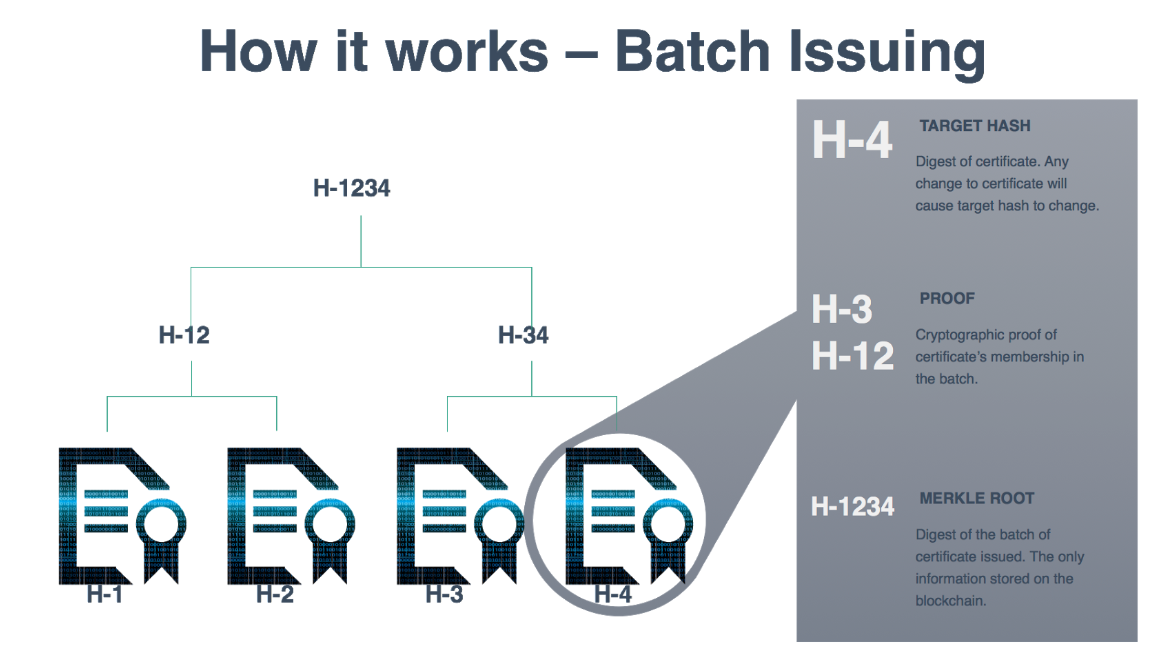
OpenCerts is able to batch large number of certificates to be issued on the Ethereum blockchain in a single transaction.
To facilitate the ease of signing and batching OpenCerts, a npm package and a CLI tool is provided.
Prerequisite
Environment
OpenCerts Data File
To follow through this section, please have all the certificates generated from the previous step in a single folder.
CLI Tool
Installing the CLI Tool
Clone the certificate-cli source code repository to your deployment environment
Navigate into the directory
cd certificate-cli
Install the dependencies for the package
npm install --production --ignore-scripts
Using the CLI Tool
Place the unsigned certificates into a folder
mkdir unsigned_certs mv <path/certs> unsigned_certs
Run the CLI Tool to batch the certificates
node index.js batch unsigned_certs signed_certs
Sample output:
2018-08-30T05:06:55.313Z info: Batch Certificate Root: 70250f22ecaa7c12cdde4a4bc6dc3bf2464433691cd462bcfe980d7e85f6a06c
Upon successful batching of the certificates, the merkle root for the entire batch will be printed and the signed certificates will be found in the folder signed_certs.
Note the merkle root, it will be published onto the certficate store in later steps.
NPM Package
For the documentations for writing custom application to process the certificates, refer to the documentation for OpenCerts